- Credits
- 1,086


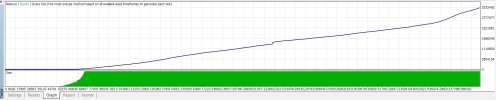
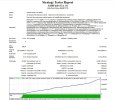
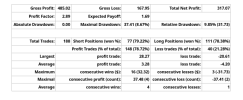
I rewrote the code almost entirely because the original was unreadable—full of junk variables and convoluted logic. I clarified the structure and implemented proper order management and robust margin checks. I also changed the name to avoid confusion. The original Expert Advisor was designed for the M1 timeframe; however, on XAUUSD M1, there is a lot of market noise, and the spread and slippage completely ruin the results. Testing revealed that signals are much more stable on the M15 timeframe, with fewer false triggers. I am currently testing the next version of this Expert Advisor on a demo account. The results in the strategy tester have been excellent—it looks almost like a "Holy Grail" system—so I plan to link this version to Myfxbook. We shall see how things unfold from here.
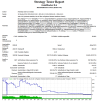
Tut mir leid, aber ich will keine Illusionen zerstören. Ich möchte andere Händler einfach vor dem Fehler warnen, ihr Geld zu verlieren, indem man auf gefälschte EAs vertraut. Wenn es Ihnen gelingt, eine profitable EA zu programmieren, lassen Sie es uns bitte wissen. Ich bin selbst ein begeisterter Programmierer und arbeite derzeit daran, etwas zu schaffen, von dem wir alle profitieren können.Ja, da hast du absolut recht. Backtesting – selbst mit den Tick-Daten, die ich von Tickstory verwende – ist nur eine Simulation. Die Ergebnisse können bei einem Demo-Account variieren, und bei einem echten Account ist alles völlig anders: Verzögerungen, Provisionen, Verzögerungen, Psychologie. Das verstehe ich vollkommen. Die erwähnten Screenshots stammen von einer anderen Version des EA (der nächsten, neueren). Sie haben nichts mit der aktuellen Version zu tun, die ich gepostet habe, also verwirre sie nicht. Ich teste es gerade auf einem Demo-Account und werde sehen, wie es läuft. Wenn es auf einem Demo-Konto nicht praktikabel ist, werden wir weiterhin nach einer anderen Lösung suchen. Ich mache mir keine Illusionen, dass es im echten Leben "superprofitabel" ist.
I've updated the robot for gold: now it's inside SuperTrend+ADX and Keltner+RSI instead of PSAR + Momentum and Bollinger Bands — it makes less noise and allows you to catch trends better. To make it less difficult to set up, I wrote detailed instructions on settings and modes. The strategy has been tested only on a demo account, while real trading has not yet been tested. I am waiting for your feedback — write how it behaves on the charts, what you like, and what can be redone.
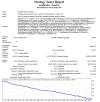
I'm posting the GoldFader New EA version for MetaTrader 5. Logically, this is exactly the same Expert Advisor that was already here in the MT4 version — strategy, entry modes and trawl remained unchanged. The code has been completely rewritten for MQL5 while maintaining all the original mechanics. MT5 has some nice features that were missing in MT4. I'm posting it "as is" — a ready-made project, compiled without errors. All parameters are set up, and you can immediately attach them to the XAUUSD chart. It will be interesting to hear from you how it behaves on the chart, whether it is stupid on strong movements, what can be improved: add filters, change the logic of sessions or what else, test results — share in the topic, it will be great to compare with the work of the MT4 version
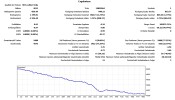
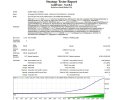
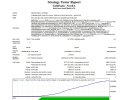
hi, can you share your set ?Yes, that's right, default settings can really leak. The EA is designed for gold, and it is very capricious to the parameters of indicators (SuperTrend, ADX, Keltner, RSI) and stop management. I ran the optimization on tick data from Tickstory, with TakeProfit and StopLoss disabled, left only the trailing, which turned out to be, I'm applying the results. It can be seen that with proper selection of the SuperTrend multiplier, the ADX threshold and Keltner periods, equity comes out as a plus. Just launch an Expert Advisor with default figures — it is almost guaranteed to get a minus. It is necessary to select the parameters for your period and broker, especially if you trade without hard TP/SL. And be sure to use tick data (at least 99% of the quality), otherwise the tester is lying godlessly on gold.
There is no ready-made settings file yet — the Expert Advisor and the instructions are completely new, and I have just posted them for discussion. I have only just started testing them myself, and there are no universal settings that will work for everyone, as the price of gold varies greatly depending on the period and the broker. I was hoping that the forum users would join in, adjust the settings to their own conditions, and share their observations. Our goal in this thread is not to distribute ready-made profits, but to work together to find the best settings and make the Expert Advisor more useful for everyone. So if there are results (even bad ones) - throw, we will deal. Only through joint efforts something worthwhile will be born.
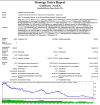
To check if I had an error in the quotes, I uploaded new tick quotes from Tickstory for 01.10.25–05.15.26 and ran the test with the same settings that I posted earlier – I got a different result, I attach a screenshot. Two opposite tests don't mean anything: different broker, different data quality, spreads, trading time – everything affects. So it's best for each participant in this thread to spin on their own terms and decide whether it works or not.
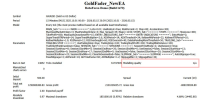
also you have little drawdown. can you share exactly the EA you used? is the one from Post #1 ? Default settings? ThanksI know I had said that I was going to stay in the background and just watch as this thread progresses, but I just have to share with you what I have found out on my live account.
As this thread progressed, we were looking at mango scalper or even the newest ea called Gold Fader. But before them was an ea called the Scalper_Autolot.ex4
I really have to say that over that last 2 weeks that Scalper autolot is doing great.
I had first attempted to use it on demo accounts and then after seeing the results I went live with it. Over the last 2 weeks it made very nice gains.
Here are the results from the live account so far.
I started it with $200 just to be safe, and it is now $450
I highly suggest to look at these results and then use this information to incorporate what ever you need to use.
I like this ea due to it being stupid proof!!! Just plug the ea onto the chart and just let it go. It will automatically adjust the lot sizes as it gains momentum or takes losses.
It is best not to watch the ea too close. Due to the ea making multiple trades when it is going against you. It is best just to allow the ea to finish its task and then come back later. If you watch the ea too close you may just decide to exit the losses and close out too early.
So far it is working for me....I will update this in another week to 2 weeks to show you what it has done at that point. If it loses, I will show you......If it profits I will show you.
Stay tuned.