- Credits
- 510
Trade Manager By AK
Hi guys,I want to share one of my latest projects called Trade Manager By AK. This is basically a trade management EA/tool that I built mainly for traders who already have their own strategy but want an easier way to manage their open trades. It is not a signal EA and it does not decide when to BUY or SELL.
You still decide your own entry.
The main purpose of Trade Manager By AK is to help automate the repetitive part after you enter a trade.
For example, instead of manually moving SL, calculating lot size, setting partial close, managing multiple TP levels or monitoring grid positions, you can configure the rules and let the EA handle those tasks for you.
Some of the main features:
 Visual Entry, SL & TP
You can manage Entry, Stop Loss and Take Profit levels directly from the chart.
Risk / Lot Size CalculatorLot size can be calculated using:
- Fixed Lot
- Fixed Cash Risk
- % Balance
- % Equity
Break Even & Trailing StopYou can configure Break Even and Trailing Stop based on your own preferred settings.
Partial Close & Multiple TPSupports partial closing and up to 3 Take Profit stages.
Useful if you like to secure some profit while leaving part of the position running.
Grid / Layering ManagementThere are several layering methods available:
- Sequential Pending Orders
- Full Pending Order Grid
- Market Triggered Layering
- Fixed Lot
- Lot Multiplier
- Additive Lot
Basket ManagementFor grid positions, you can choose between:
- Averaging TP
- Original Trade TP
There is also an optional adaptive SL function.
Equity GuardYou can set profit or loss limits using:
- Fixed Money
- Percentage
Scheduled Trade ClosingYou can configure automatic closing based on:
- Daily schedule
- Weekly schedule
- Monthly schedule
- Market Session closing
Flexible Trade SelectionYou can choose what Trade Manager By AK is allowed to manage.
For example:
- Current Symbol
- Entire Account
- Specific Magic Number
- Specific Symbols
- Manual Trades
- Trades opened by another EA
Chart Panel
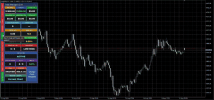
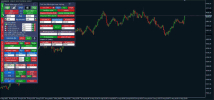
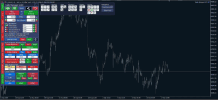
Most functions are controlled from a movable chart panel.I tried to keep the layout simple with grouped controls, colour-coded buttons and an information dashboard so you can see the important trade information without opening too many settings.
You can also change the chart appearance/theme without affecting the trade management functions.
Simple Example
The basic idea is something like this:You find the setup → You enter the trade → Set your management rules → Trade Manager By AK handles the repetitive management.
You still remain in control of the trading strategy and entry decision.
I mainly built this because I wanted one tool that could handle different trade management styles without needing several separate scripts or EAs running on the same chart.
Still testing and improving some parts, so feedback and suggestions are always welcome.
If you guys normally use trade manager EAs, feel free to share what functions you think are important or what could be improved.
 Risk Reminder
Trading involves risk. Grid and increasing lot sizes can increase exposure significantly, so please test your settings on a demo account first.
For automated management to work, MT4/MT5 must remain running with AutoTrading / Algo Trading enabled. Execution may also depend on broker and market conditions.
I will use this link to put a new updated version later - DOWNLOAD FILES HERE