

Hi,
I'm a veteran software developer but new to mt4 programming. I'd to know how to use an indicator in my code like the yellow box with black arrow in the picture attached. I'm able to use other indicators (macd, ma, etc) but am unsure how to use this particular indicator. When I hover my mouse over the indicator I see:
"Agimat_Reversal(60,5,3)
Time 2020.06.12 18:00
Value1: 1.1213"
How can this yellowbox + black arrow be used in an EA or script?
In case you can't read the names of the indicators they are:
+++AgimatFX2018pro_PriceLineGrid
+++AgimatFX2018pro_CS
+++AgimatFX2018pro_ConA
+++AgimatFX2018pro_ConB
+++AgimatFX2018pro_BA
+++AgimatFX2018pro_angular_momentum
+++AgimatFX2018pro_Alert
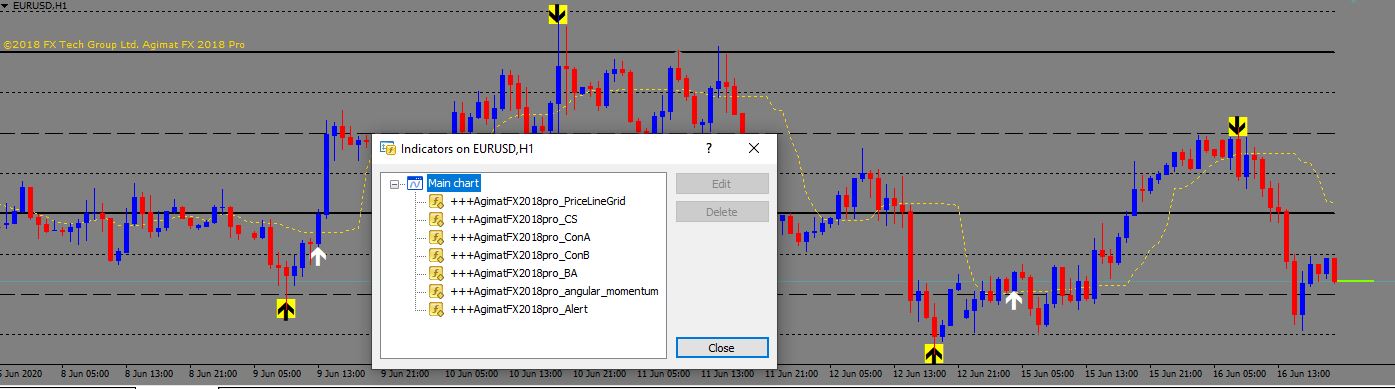
I've tried this small code snippet as a script that I drop on the chart with each of the indicators mentioned above. +++AgimatFX2018pro_ConA gave the best results by printing out a few values but not at shift 12 which is where the yellow box + black arrow shows up (near the recent price high). And none of the values corresponded to values where the yellow box + black arrow appear.
int shift = 1;
double value1 = 0;
for(shift = 0; shift < 40; shift++)
{
value1 = iCustom(_Symbol,_Period,"+++AgimatFX2018pro_ConA",60,5,3,0,shift);
Print("for shift = " + shift + " value1 is " + value1);
}
}
Thanks
I'm a veteran software developer but new to mt4 programming. I'd to know how to use an indicator in my code like the yellow box with black arrow in the picture attached. I'm able to use other indicators (macd, ma, etc) but am unsure how to use this particular indicator. When I hover my mouse over the indicator I see:
"Agimat_Reversal(60,5,3)
Time 2020.06.12 18:00
Value1: 1.1213"
How can this yellowbox + black arrow be used in an EA or script?
In case you can't read the names of the indicators they are:
+++AgimatFX2018pro_PriceLineGrid
+++AgimatFX2018pro_CS
+++AgimatFX2018pro_ConA
+++AgimatFX2018pro_ConB
+++AgimatFX2018pro_BA
+++AgimatFX2018pro_angular_momentum
+++AgimatFX2018pro_Alert
I've tried this small code snippet as a script that I drop on the chart with each of the indicators mentioned above. +++AgimatFX2018pro_ConA gave the best results by printing out a few values but not at shift 12 which is where the yellow box + black arrow shows up (near the recent price high). And none of the values corresponded to values where the yellow box + black arrow appear.
int shift = 1;
double value1 = 0;
for(shift = 0; shift < 40; shift++)
{
value1 = iCustom(_Symbol,_Period,"+++AgimatFX2018pro_ConA",60,5,3,0,shift);
Print("for shift = " + shift + " value1 is " + value1);
}
}
Thanks
Last edited:
