• Welcome back! Thank you for being a part of this Traders Community. Let's discuss and share :)
    Selamat datang kembali! Trimakasih telah menjadi bagian dari Komunitas Trader ini. Mari berdiskusi dan berbagi :)

New EA GoldFader_NewEA returns: modified so that silence is canceled

NPNavigator

New Member
Credit Hunter
Credits
395
Hello, colleagues in gold speculation!

I once posted one of the versions of GoldFader_EA here — then the silence was such that you could hear the spread sliding on XAUUSD. But I wasn't offended, I rolled up my sleeves and took a good look at the adviser. Meet GoldFader_NewEA — now with a panel, brains and character.

What kind of beast?

This is a multi-mode scalper that does not enter the market with a saber drawn, but carefully arranges the ladder of pending orders. It works strictly according to XAUUSD (on other characters — at your own risk, but the warning is in the code).

The key features of this advisor are:

Two trading cores

Mode 1: SuperTrend + ADX. Loves the trend and doesn't bother when adx is asleep.

Mode 2: Keltner Channel + RSI. Catches bounces from the channel boundaries, but without fanaticism — the RSI should not be extreme.

You can turn it on individually (Mode 1/2), via "OR" (Mode 3, there are more signals) or a strict "And" (Mode 4, the signals are rare, but probably more accurate).

Stepped deposits with dynamic step

You can set a fixed distance between orders or link it to the ATR. Thanks to this, the grid does not stick together into a mess and does not put orders nose to nose.

Smart expiration and a momentum filter

Deposits live for a limited time (Acceleration), and if the market fades, the ADVISER removes them himself via DeletePendingMomThreshold. No "hang-ups" for a week.

Price averaging trailing

The UseAveragePrice = true option does not do tracking for each order separately, but for the average price of the direction. It's like you have one average position. Activated after TrallingStart points, trail distance = LockProfit.

Virtual stops

Real SL/TP can be disabled and virtual ones can be enabled. This saves brokers from hunting for stops, and at the same time allows you to drive the grid without unnecessary eyes.

Modern Dashboard

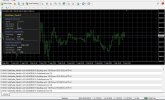
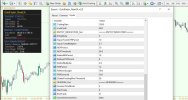
Dark, stylish, shows the signal, orders, profit, ATR, spread, equity/balance, drawdown and free margin. It is updated every 100 ms, it does not slow down. The eye is happy when you watch the green numbers run.

Protection from global dropdown and auto-profit

If the equity has dropped by MaxEquityDrawdownPct, everything is closed. If the total profit has reached 200 * lot, everything is also closed. The adviser knows how to say "enough is enough" in time.

Recommendations for use:

• Timeframe: by default, the indicators are considered on the current chart (I raced on M15, but you can try M5/M30).

• Tool: XAUUSD, 35-point spread filter — tolerable for most kitchens/normal brokers.

• Risk: a fixed 0.01 lot on the demo, but for real ones, it's better to enable UseRiskLot and set a comfortable percentage. The global drawdown of 15% is by default, you can preload.

• Virtual Stops: Run on demo first to understand the logic. You can turn off the real SL/TP (set to 0) and leave only the virtual ones — fewer traces in the glass.

• EntryMode Modes: Start with Mode 1 (trending) or Mode 2 (channel). Mode 3 (OR) gives more inputs, but can be noisy. Mode 4(S) — only if you are a perfectionist waiting for the perfect setup.

• Sessions: adjust it to your time zone. It is recommended to set SessionTimeMode = 1 (server time) in the tester, because local time does not fly in the tester.

What's new compared to that "quiet" version?

The averaged trailing has been completely rewritten, a panel, virtual stops, a momentum filter for removing deposits, dynamic distance via ATR and a bunch of minor protections have been added. In fact, this is no longer a shy freshman, but a seasoned third-year student who knows when to enter and when to leave for a smoke.

I will be glad for any feedback, constructive criticism and, of course, profitable schedules. If suddenly the adviser is ignored again, well, I'll put him in the "And" mode and go meditate on SuperTrend.

Download, test, and don't forget about money management. And remember: gold loves the patient!
 

Attachments

Khi tôi chuyển dữ liệu sang biểu đồ đầu tiên thì hoạt động bình thường, nhưng khi chuyển sang VPS thì cả ba biểu đồ đều không hoạt động, mặc dù các tài khoản giống hệt nhau và tôi đã tăng spread lên 500. Bạn có biết lỗi là gì không?
 
Thanks for sharing. Starting forward demo, testing at M5 XAUUSD, with default settings and MM 1% risk. Is anything that you suggest to change in the settings or leave them as is?
 
Khi tôi chuyển dữ liệu sang biểu đồ đầu tiên thì hoạt động bình thường, nhưng khi chuyển sang VPS thì cả ba biểu đồ đều không hoạt động, mặc dù các tài khoản giống hệt nhau và tôi đã tăng spread lên 500. Bạn có biết lỗi là gì không?
The classic of the genre "it flies on the locale — it lies on the VPS"!
Most likely, this is the case (in order of probability):
1. Server time vs local time (main suspect)
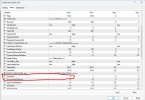
You have SessionTimeMode = 2 (local time), but on a VPS it differs from your home computer. In the tester, the adviser sees "I'm on a VPS, give me server time," but when you drive him live on a VPS in 2 mode, he honestly looks at the local time of the virtual machine. And there, let's say it's UTC, and your 6-23 turns into who knows what.
Solution: set SessionTimeMode = 1 (broker's server time) — this is the most reliable option on a VPS.
2. GMT shift and trading sessions
Even with SessionTimeMode = 1, you need to check which StartTrade and EndTrade you have set. The broker's server may be GMT+2/GMT+3, and your usual numbers from the locale could "leave" for a couple of hours.
Solution: check the server time in Market Watch and adjust the StartTrade/EndTrade.
3. DLL files and imports (silent killer)
A VPS often has a stripped-down Windows without the necessary libraries. MQL4 rarely requires a DLL, but if the ADVISOR was compiled with the check mark "Allow DLL imports", but there is no DLL on the VPS, it simply does not start silently.
Solution: check the "Dependencies" tab in the MetaEditor. If the DLL is not needed, recompile without importing.
4. File Access rights
The Advisor may be trying to write logs/files to a folder that is protected on the VPS. It works on Win10, but not on Windows Server. Error 5002 or 5004 usually flashes in the logs.
Solution: look in Experts → Logs to see if there is any swearing on the files.
5. Three graphs, one symbol — the wonders of synchronization
You said, "all three schedules have stopped working." If these are three copies of the adviser on one XAUUSD, they could enter the clinch. Is the Magic Number the same? If so, they are fighting for the same orders, and everyone is trying to close/modify someone else's.
Solution: give them different Magic items (for example, 1234, 1235, 1236).
6. The spread on the VPS is higher than it seems
You increased the Max_Spread to 500, but keep in mind: the spread is measured in points, and on a VPS, at the time of a rollover or low liquidity, the spread on gold can fly far beyond 500. The advisor just stands there and doesn't enter.
Solution: look at the Spread Filter line in the Dashboard — it shows the current spread / acceptable. If it turns red, then that's the problem.
In 90% of cases, they are solved by changing the time regime. VPS is an insidious beast, it likes to pretend to be "identical" to your computer.
 
Thanks for sharing. Starting forward demo, testing at M5 XAUUSD, with default settings and MM 1% risk. Is anything that you suggest to change in the settings or leave them as is?
I am glad that the ADVISOR has reached the forward demo. To be honest, out—of-the-box settings are like the basic firmware of a car. You can drive, but if you know where to turn, you can improve acceleration and reduce fuel consumption.

What would I recommend for a forward test on M5 XAUUSD at risk of MM 1%:

________________________________________

1. Angle of attack — EntryMode

Currently, EntryMode = 1 (SuperTrend+ADX) is set. On M5, these are fairly frequent trend signals, but there are also a lot of false breakouts. I would try this way:

Run Mode 1 for a week to see how many entries and what percentage of stops.

Then a week later, Mode 2 (Keltner+RSI, channel bounce) — he behaves more calmly on the M5, looking for kinks, and not running after every pulse.

If you want a golden mean: Mode 4 (both signals together) — there are few inputs, but they are usually fatter. Mode 3 (either of the two) — can spam with orders on the news.

Personally, I would start with Mode 2 for the demo, it's less nervous at the top five.

________________________________________

2. Battery life — Acceleration

900 seconds on the M5 (that's 15 minutes!) — it may be too much for a scalper. The order is hanging for 3 candles and waiting. If the impulse is not confirmed, it is already outdated morally.

Try it for 300-600 seconds (5-10 minutes). The delay will not "freeze", and the grid will react faster.

________________________________________

3. Trailing distance — LockProfit

It costs 50 points. On M5, gold often makes a sharp jump to 80-100 and rolls back. If the trailing line is too tight, it can knock out ahead of time.

I would try LockProfit = 80-100. Let the position breathe wider, and let the TrallingStart be 120-150 (trail activation later).

________________________________________

4. Virtual Stops — UseVirtualSL/TP

Disabled by default. If your broker is "sensitive" and likes to touch the stops, turn on UseVirtualSL = true and set VirtualStopLoss to about 300-400 points. Then the adviser will close the position on the ticks by himself, without putting a real stop outside. This saves you from the "spread hunter".

In this case, the real StopLoss can be reset to zero altogether (or left as an emergency, say, 400-500).

________________________________________

5. The maximum spread is Max_Spread

35 points on M5 is a safe margin for gold in a quiet time, but not enough for an Asian night or news release. The advisor will remain silent.

Raise it to 50-60. Dashboard will show if the spread is really suffocating. It's better to let him enter less often, but he doesn't miss the good moments.

________________________________________

6. Dynamic Distance — UseDynamicDistance

Currently disabled, it costs FixedDistancePoints = 100. On M5, 100 points between orders is about 4-6 dollars? It seems to be normal for gold. However, if UseDynamicDistance = true is enabled, the EA itself will expand/shift the grid depending on the volatility (ATR). In quiet times, the step will decrease, in a storm it will increase.

Try enabling it by setting DynamicDistanceMultiplier = 1.2–1.5. This will make the grid more adaptive.

________________________________________

7. Closing at the end of the session — CloseOnSessionEnd

If you have clear sessions (for example, London + New York), it makes sense to enable it so as not to leave orders for the Asian night, where the spread is wide and there is zero movement.

CloseOnSessionEnd = true. At the same time, adjust StartTrade and EndTrade to the broker's server time (GMT+2/GMT+3).

________________________________________

The final checklist "for the start" on the M5:

EntryMode = 2 (or 1 for the test)

Acceleration = 600

LockProfit = 80

TrallingStart = 120

UseVirtualSL = true, VirtualStopLoss = 350

Max_Spread = 50

UseDynamicDistance = true, DynamicDistanceMultiplier = 1.3

CloseOnSessionEnd = true (if you only trade daily sessions)

The rest — MM 1% is already worth it, it's sacred. Keep MaxEquityDrawdownPct at 15-20% so that the demo doesn't turn into a pumpkin overnight.

And be sure to keep an eye on the Dashboard — it will tell you in real time why the Expert Advisor is silent (red spread, drawdown, no session). If anything, write me how the charts go. Good luck on the forward, let the equity be green!
 
Vâng, nó hoạt động, nhưng chậm hơn vài giờ so với trên máy tính để bàn. Tôi muốn hỏi liệu EA này có thể chạy trên tài khoản thực và trên nền tảng của nhà môi giới với mức chênh lệch giá rất cao không? Tôi có thể tăng mức chênh lệch giá lên mức tối đa không, vì tôi muốn thử nghiệm nó trên tài khoản thực?
 
Vâng, nó hoạt động, nhưng chậm hơn vài giờ so với trên máy tính để bàn. Tôi muốn hỏi liệu EA này có thể chạy trên tài khoản thực và trên nền tảng của nhà môi giới với mức chênh lệch giá rất cao không? Tôi có thể tăng mức chênh lệch giá lên mức tối đa không, vì tôi muốn thử nghiệm nó trên tài khoản thực?
Is it possible to run an Expert Advisor on a real account with wild spreads?
Technically— yes. But there are nuances here, as in the joke about hedgehogs: "it will hurt, but carefully.
" You can increase Max_Spread without any problems. The Max_Spread parameter is a filter above which the EA simply does not open new orders. If the broker has a gold spread of 80-100 points, set Max_Spread = 150 or even 200 so that he does not remain silent forever.
But you understand: GoldFader is a scalper. His logic is focused on small movements. Every entry with a huge spread is immediately a minus in your pocket. For example, with a spread of 100 points and a TakeProfit of 200, you actually go 100 points to zero and 100 points to the goal. And if the market sneezes in the wrong direction, a virtual stop (say, 300-400) can work much faster.
Trailing suffers too. LockProfit = 50 with a spread of 100 is not trailing, but "please close me right away." The trail distance will have to be increased to at least 150-200, so that it does not knock out a position immediately after opening.
My advice on a real account with a high spread:
1. First— the demo account of this particular broker. Set Max_Spread = 200, select the remaining parameters based on the spread (increase the virtual SL, raise the LockProfit to 120-150, TakeProfit is better than 250-300). Keep driving for at least a week.
2. Look at the Dashboard: if the "Spread Filter" line is constantly red, even at 200, it means that the spread is even higher, and the Expert Advisor will enter extremely rarely.
3. Use EntryMode 2 or 4 modes — they produce fewer signals, but are more reliable under poor conditions. Mode 1 on a wide spread can run into a series of losses, because SuperTrend often switches to M5.
4. Consider the commission. If a broker with a high spread also takes a commission, it's very sad. Check in the tester, taking into account the commission.
Is it possible to test on a live account by simply increasing Max_Spread?
Of course you can. It's your account, your risks. No one forbids it. But as a developer, I would say: "I warned you." GoldFader was optimized for normal market conditions, and not for a "spread like an airplane wing." If you really want to, try on the minimum lot, with tight drawdown control and auto-risk disabled in order to manually count.
And one last thing: the slow work on the VPS is definitely not because of the advisor. It doesn't have heavy calculations, it quietly ticks once every 100 ms. The difference in start time is 99% the same story with local time. Switch the mode and the delay will disappear.
 
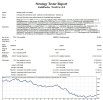
Modelling Quality 99.99%
Hi!

Thanks for sharing the results. But let's make a deal right away.: "not very good" results with 99.9% modeling quality are not a verdict, but a reason to roll up your sleeves. Let me explain what the point is here.

1. 99.9% is not a "perfect test", but an "honest test"

This accuracy means that the tester has loaded the ticks and modeled them as close to reality as possible. But it does not make the default settings automatically profitable. Imagine that you took someone else's suit, which fits perfectly on a mannequin — it can squeeze your shoulders. So it is with EntryMode=2: the standard parameters (Keltner 20, ATR 10, RSI 14, levels 70/30) are a "base", not a magic pill.

2. EntryMode=2—channel bounce, it requires calibration

Keltner Channel and RSI are very sensitive to period length and ATR multiplier. If the market has become more volatile (and gold is jumping like a rabbit in 2025-2026), the standard channel may be too narrow or too wide. As a result, the signals are either false, or the ADVISER misses the movement.

Before showing the equity chart and saying "ugh, it doesn't work", you need to at least run the optimization in the tester.:

• KeltnerMAPeriod (for example, from 10 to 50 in increments of 5)

• KeltnerATRPeriod (from 5 to 20)

• KeltnerMultiplier (from 1.0 to 3.5 in increments of 0.25)

• RSIPeriod (7-21) and RSIOverbought/RSIOversold (60-80 / 20-40)

• ADXThreshold (if used in pairs, even though Mode2 doesn't use it, but just in case)

• LockProfit and TrallingStart (especially important because tracking can be triggered earlier on ticks)

And run it for a period of at least 3-6 months, and not for the whole story at once. Gold is changing its character: the trending year 2024 and the flat year 2025 require different settings.

3. Don't forget about the spread and commission

Even with 99.9% quality, if your broker's spread and commission are not taken into account in the tester, the picture will be embellished. And then when you launch it in real life with a real spread of 35+ points and a commission of $5 per lot, the hair stands on end. In the tester, be sure to set the current spread (or slightly higher) and the commission if the broker takes it.

4. Mode 2 likes "quiet" periods.

If you tested in an area with a strong trend without rollbacks (for example, gold is growing by leaps and bounds without corrections), Mode 2 will either remain silent or try to catch the tops/bottoms and get your hands on it. This is exactly where optimization is needed: maybe it's worth narrowing the channel so that it reacts earlier to a reversal.

What do I advise you to do before giving up:

1. Enable optimization in the tester for at least the basic parameters listed above.

2. Select a section of the history (for example, the last 6 months) and optimize for profit/ drawdown.

3. Save the best settings and run the forward test on the last 20% of the data, so you'll see how stable the settings are.

4. Then compare with what was the default. The difference is usually impressive.

Remember: GoldFader is not a robot that "sat down and rode" in any clearing. This is a constructor that needs to be adjusted to the nature of the market. But when you pick up the keys, he really knows how to surprise.
 
Vâng, nó hoạt động, nhưng chậm hơn vài giờ so với trên máy tính để bàn. Tôi muốn hỏi liệu EA này có thể chạy trên tài khoản thực và trên nền tảng của nhà môi giới với mức chênh lệch giá rất cao không? Tôi có thể tăng mức chênh lệch giá lên mức tối đa không, vì tôi muốn thử nghiệm nó trên tài khoản thực
No
 
You can't accept the reality that this EA is a loser!!!
I see you're hooked by my answer, and that's a good thing, honestly. Emotions in trading can be worse than slippage on the news, I understand everything. But let's stop for a minute and exhale.

Why did I post this advisor on the forum at all?

Not to get a round of applause and a gold bar in the personal account. And certainly not to convince everyone that this is the Grail. I posted it because we're all in the same boat here: someone is writing code, someone is testing, someone is scolding, someone is refining. It is in such disputes that working solutions are born. If I wanted silence and worship, I would have posted the adviser on my own website and closed the comments. But I came to a forum where people can say, "Dude, there's a joint here," or "it didn't take off on my M5." And that's okay.

Calling an advisor a "loser" is loud, but not scary.

I don't hold onto it like a crystal vase. Yes, EntryMode=2 showed bad numbers in your test — this is a fact, and I do not deny it. But let's separate the flies from the cutlets: a "loser" is when the code is logically broken and cannot open an order under any settings. And here we are dealing with a scalper, which requires fine-tuning to a specific market. The default parameters didn't fit, so let's turn it around, but I immediately suggested optimization. It's not a loser, it's a tool with character.

Rudeness is not an engine, but a brake.

You wrote abruptly, so you care. And that's cool! But if we throw phrases like "you can't accept it," we'll slip into an argument, not a search for the truth. The forum was created to create together: someone found a bug, someone suggested an idea, someone showed optimized settings.
 
Back
Top