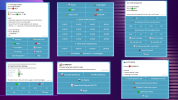
Telegram to MT5 Smart Trading EA
Complete Telegram-Controlled Trading System for MT5
Overview
TG MT5 Smart Trading EA is a
fully integrated trading assistant for MetaTrader 5, designed for traders who want to
control, monitor, and execute trades directly from Telegram.
Instead of being tied to your MT5 terminal, this EA allows you to
manage your entire trading workflow remotely, while combining
automation, strategy, and risk management into one unified system.
The EA runs on your
MT5 terminal (Desktop or VPS) and communicates in real-time with your
Telegram bot interface, acting as your personal trading dashboard.
What Makes This EA Unique
This is not just a trading bot.
It is a
complete trading ecosystem that combines:
- Telegram-based control panel
 Automated trade execution
- Supertrend-based strategy engine
- Semi-auto + full-auto decision systems
- Basket and recovery management
- External signal copying (under development)
Everything is designed to
simplify trading while maintaining professional-level control.
Core Trading Features
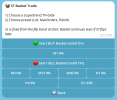
 Basket Trading Engine (Smart Recovery System)
This is one of the most powerful features.
- Trader places the first trade manually
- EA automatically manages:
- Multiple entries
- Risk distribution
- Break-even stages
- Profit targeting
What it does:
- Expands positions intelligently
- Reduces risk during drawdowns
- Secures profit through staged BE logic
Ideal for traders who want
controlled scaling and structured recovery
 Pending Trigger Mode
You can define a
price level, and the EA will:
- Wait for price to reach your trigger
- Automatically start basket trading
- Apply:
- Risk settings
- Reward targets
- Break-even rules
Perfect for:
- Breakout trading
- News trading setups
- Planned entries without constant monitoring
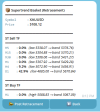
 Supertrend-Based Semi-Auto Trading
This feature assists your decision-making.
The EA:
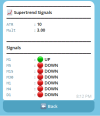
- Analyzes multiple timeframes
- Detects Supertrend direction
- Calculates retracement levels
- Sends signals via Telegram
You can:
- Review opportunities
- Decide whether to enter
- Execute trades instantly
This gives you
human control + smart assistance
Advanced Automation Features
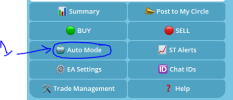
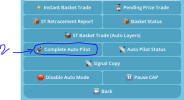
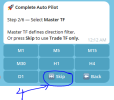
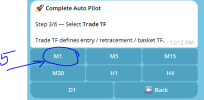
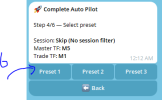
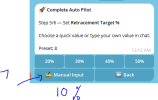
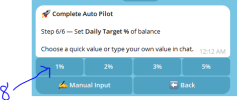
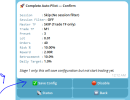
 Complete Auto Mode (Full Auto Pilot)
Turn your EA into a
fully autonomous trading system.
The EA will:
- Monitor market continuously
- Detect valid setups
- Execute trades automatically
- Manage:
- Risk
- Reward
- Break-even stages
Strategy logic:
- Based on Supertrend direction
- Uses retracement-based entries
- Avoids random entries and false signals
Best for traders who want
hands-free trading with logic-driven entries
 Signal Copy (Under Development)
This upcoming feature allows:
- Connecting external Telegram channels
- Automatically detecting BUY/SELL signals
- Executing trades via EA logic
With added safety:
- Filtering
- Validation
- Risk control via presets
Turning your EA into a
signal execution engine
Built-in Risk & Trade Management
The EA is designed with
professional risk handling:
- Multi-stage Break-Even system
- Dynamic lot handling
- Auto SL based on:
- Profit locking mechanisms
- Basket-level management
- Daily profit tracking
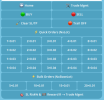
Trade Grid Panel (Manual + Assisted Trading)
For traders who prefer manual control:
You get a
Trade Grid Panel, allowing you to:
- Place trades manually
- Apply:
- Risk %
- SL / TP
- Break-even logic
- Supertrend-based SL
- Combine manual entries with automated management
Best of both worlds:
Manual execution + automated protection
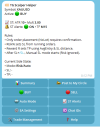
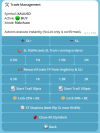
Telegram Control System
Everything is controlled through Telegram:
- Start / Stop trading
- Enable Auto Mode
- Manage baskets
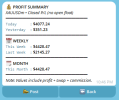
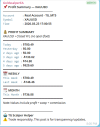
- View profit summary
- Receive alerts:
- Supertrend flips
- Session alerts
- Trade status
You don’t need to open MT5 constantly.
Your phone becomes your trading terminal.
Smart Monitoring & Analytics
The EA provides:
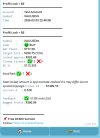
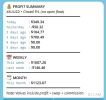
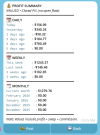
- Daily, weekly, monthly profit summaries
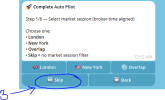
- Session tracking (London, NY, Overlap)
- Trade activity logs
- Real-time status updates
All delivered directly via Telegram.
Who Is This EA For?
This system is ideal for:
Beginner Traders
- Guided trading through signals
- Reduced emotional trading
Intermediate Traders
- Semi-auto decision making
- Better risk structure
Advanced Traders
- Full automation
- Strategy execution at scale
- Remote VPS-based trading
How It Works
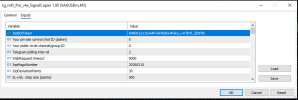
- Install EA on MT5 (Desktop or VPS)
- Connect your Telegram bot
- Use Telegram as your control panel
- Choose your trading mode:
- Manual
- Semi-auto
- Full auto
- Let the EA handle execution and management
Summary
TG MT5 Smart Trading EA is a
complete trading framework, combining:
- Automation
- Strategy
- Risk control
- Remote access
All in one system.
Whether you want
full control, smart assistance, or complete automation, this EA adapts to your trading style.


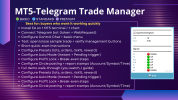
 One-tap Market Orders (NxLot grid buttons)