• Welcome back! Thank you for being a part of this Traders Community. Let's discuss and share :)
    Selamat datang kembali! Trimakasih telah menjadi bagian dari Komunitas Trader ini. Mari berdiskusi dan berbagi :)

New EA DeepGold LLM EA – when gold listens to artificial intelligence (well, almost)

It seems that we have not an isolated case here, but a direct flash mob "HTTP 1003"! The DeepSeek server apparently decided that Doomsday had come and turned on the "fortress siege" mode for everyone at once.

It happens when DeepSeek has a global glitch, or they massively shake up access rules, and half of the users become "suspicious" simply for breathing.

What to do while they fix their neurons there:

• Don't change keys like crazy — it won't help, you'll only hit the limits. One key for everything.

• Check the SpikeCooldownSec in the settings — if it is too small (like 5 seconds), the server thinks that you are attacking it. Hold at least 300 (5 minutes) — let the neural network digest the previous query.

• Try a VPN or IP change — sometimes Cloudflare bans a specific range of addresses, not you personally. Moving to another country can virtually solve the problem.

• Look at the DeepSeek status (if they have a status page) - perhaps they are honestly writing there: "We've fallen, wait."

Well, remember: if the neural network does not respond, it does not mean that it does not love you. It's just that it's "Monday" for her. We are waiting for DeepSeek to stop acting up. Patience and green candles for everyone!
So based on this , the EA just active on NY Session ?
And i think the problem all of the EA Out there is about spread and the regime market.
 
Hi! I understand the desire to roll back to a time when "everything worked and didn't buzz," but it's like a favorite bar that's closed for renovation, and the "deepseek-chat" sign is no longer lit. DeepSeek has officially retired the old model, so version 1.4 from message #54 will now knock on a closed door and receive an HTTP 400, which is no better than 1003, just another sad number.

We've moved to the new model because the old entrance has been closed. It will be easier to use deepseek-v4-flash now — it's really less picky. I can't say how soon, but I'll finish the version where you can choose between deepseek-v4-pro and deepseek-v4-flash.

So the rollback is a ticket to the depot, not to profit.
Can we not use Phyton to do so, instead of relying on Deepseek engine?
settings/analysis in Py, trade taken surely use MT5
 
Can we not use Phyton to do so, instead of relying on Deepseek engine?
settings/analysis in Py, trade taken surely use MT5
You're absolutely right — Python is like a Swiss army knife with a laser sight for analysis and neural networks: flexible, powerful, a library wagon. But I deliberately went through the "all in one" on MQL5, and here's why:

1. The principle of "one button"

The ADVISOR should work according to the "downloaded —launched — forgotten" principle. One .ex5 file, no pythons, virtual environments, dependencies, or dancing with a tambourine. I opened the terminal, attached it to the chart, and the gold went. This is critical for beginners.

2. Combat reliability

When you have Python + MT5 + bridge between them, there are three points of failure. The Python script crashed, communication with the terminal was lost, the signal file was not read — hello, missed input. And the MQL5 Expert Advisor runs right in the terminal, without external dependencies. Spreads, ticks, and execution are all nearby.

3. Reaction speed

There is a delay through an external file: Python calculated → wrote → Adviser read → executed. While the file is going back and forth, the trend has already gone by 50 points. Within a single process, the signal goes directly to onTick() without intermediaries.

4. The Unix way is not yet for everyone

Splitting into components is cool for geeks and custom solutions. But 90% of the forum's users want a finished product, not a "build it yourself" constructor. Therefore, the first version is as simple and self—sufficient as possible.
 
For XAUUSD robots, I usually check whether the strategy depends on trend strength, spread widening, and session timing. A backtest alone can look good, but forward testing should confirm whether entries survive real broker execution, especially during news and low-liquidity hours. What conditions are you using to decide when the robot should stop trading?
Dear samshoshoEA, I think I am beginning to suspect that you are a very persistent AI bot that is testing my convergence response.

No kidding, but your question (for the third time in a thread) was discussed in detail in message No. 16 — it's right on the shelves. So we scroll a little higher, find post No. 16, and voila — the truth is there!

And if you are still a human being, I apologize for the false accusation of being a bot, it's just that the exact repetition is very suspiciously accurate.
 
Hello, colleagues!

I used to post quite classic Expert Advisors here – indicator, martingale, grid… But this time I was carried away towards neural networks and large language models. Why? Yes, because there are no such advisers on the forum, and the topic is wildly interesting. I wanted to understand if LLM (in my case DeepSeek) can really help in trading, or if it's just a HYPE.

This is how DeepGold LLM EA was born, a robot that sends a "market snapshot" directly to the DeepSeek cloud neural network every 15 minutes (and with sudden movements), and it returns a forecast: buy, sell or stand aside. And yes, he trades only in gold (XAUUSD) and strictly on M15 – no amateur activity.

What's under the hood? Key features

• A living AI brain - the Expert Advisor collects a lot of data: ATR, ADX, RSI, CCI, Bollinger bands, volumes, the last 30 candlesticks of M15, open positions, the current P&L, and even the history of its past forecasts with a "guessed/not guessed" rating. All this goes to the DeepSeek server, and the model returns a number from 0 (furious SELL) to 1 (confident BUY) along with a confidence score.

• Protection against "nonsense" – if the confidence is below the set threshold (65% by default), the transaction is not opened. This is how we cut off weak signals.

• Dual stop system – you can use real StopLoss / TakeProfit or virtual stops (so as not to give them to the broker), as well as a trailing stop, taking into account the average price of all positions.

• Smart risk management – the risk per trade is calculated from the balance, there is a daily loss limit (by default, 5% – and trading freezes until the next day), maximum spread, Spike Filter, protection against cascading entry through the ATR distance.

• Schedule and timezones – you can set the UTC trading hours (so as not to get into the Asian "mess"), as well as compensate for the server time offset.

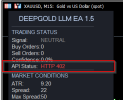
• Own dashboard – a window with the current signal, number of orders, AI confidence, API status, ATR, spread, equity and drawdown is displayed on the chart. Everything is clear, without unnecessary graphics.

• Self–learning (almost) - the EA remembers its forecasts and checks after a set number of bars whether they have come true, transmitting this feedback in the following queries. This is how the model sees its mistakes and adjusts.

• Live only – it won't work in the strategy tester (I specifically blocked it), because it's pointless without a real connection to the API.

Recommendations for use (highly recommended!)

1. Start with a demo account. Even if you are an MQL5 guru, this advisor is an experiment. Let him run for a couple of weeks without risking any hard money.

2. Get the DeepSeek API key. They give you a decent amount of free tokens, but if you want to actively send requests, you may need to top up your balance. Insert the key into the parameters.

3. Adjust the trading time to your UTC. The default time is 9-23 UTC, which roughly covers the European and American sessions. Check if the server time matches.

4. Take a risk on the deal – don't be greedy. 1% at a stop of 400 pp is quite a working option for the test. If you set 5% or higher, the daily limit will work quickly in case of a series of losses.

5. Do not change the timeframe and symbol. The robot is rigidly attached to the XAUUSD M15, it will simply refuse to work on other instruments (it will issue an Alert).

6. Keep an eye on the instrument panel. If the API status is red, check the Internet or the token balance.

7. The Advisor is not the "Grail". This is an assistant that uses a probabilistic approach. The model can be wrong, the market is an unpredictable thing. Treat it like an advanced assistant, not like a magic "loot" button.

The advisor is accompanied by detailed instructions describing each parameter and the logic of its operation. Download, try, and share your impressions. I will be glad for any feedback, especially from those who are already experimenting with LLM in trading.

If you have any ideas on how to improve the "brains" – write. Perhaps we will add support for other providers (OpenAI, Claude) or more sophisticated strategies.

Good luck and profits!
Thank you, very nicely presented & an intresting query as well. It does go to show that some of us here are wide awake!
 
Last edited:
Friends, hello everyone!

I’d like to share some news: the DeepGold EA project is gradually moving to the next stage of development. The code has been significantly reworked, new features have been added (LLM model selection, news filters, dollar index tracking), and now some of these features will be available as a separate commercial version.

Why is that? It’s simple: maintaining and developing the tool requires resources — API requests, time for development and testing, support. To ensure the project lives and develops, rather than being archived, it needs financial support. This is a natural path for many projects.

At the same time, the basic version that has already been published will remain available. New features will appear in the paid version for those who need them and want to support its development.

Thank you to everyone who participates in discussions and testing — it’s your activity that helps make the advisor better.

All the best and green candles!
 
For XAUUSD robots, I usually check whether the strategy depends on trend strength, spread widening, and session timing. A backtest alone can look good, but forward testing should confirm whether entries survive real broker execution, especially during news and low-liquidity hours. What conditions are you using to decide when the robot should stop trading?
Dear participant, thank you for your perseverance — it deserves better use.

Your question is indeed important, and I have already answered it earlier in this thread. But it seems you’re asking it with enviable regularity, as if you’re checking whether I’ve changed my mind overnight. I hasten to reassure you: the conditions for suspending trading in the robot are as follows:

• Wide spread — if the broker widens the corridor, the advisor pauses (MaxSpreadPoints parameter).

• Trading session — at night, when liquidity is as scarce as in the desert, the robot rests.

• News filter (in the new version) — before important releases, the advisor doesn’t interfere with the market.

• Volatility — if the market is too turbulent, it doesn’t take any unnecessary risks.

If you have a specific scenario you’d like to test, let’s discuss it in detail. In the meantime, esteemed (or esteemed bot?), here’s a suggestion: slightly vary the wording of the following question. Otherwise, it feels like you’re stuck in a time loop, like in the movie “Groundhog Day”. And yes, perhaps the administration should take a closer look at this phenomenon — maybe we’ve got a very polite but extremely persistent bot that keeps repeating things on our forum.
 
Hi, thank you for sharing the DeepGold EA for free. I really appreciate your work and would like to test and study the EA more thoroughly.


I tried running DeepGold EA in the MT5 Strategy Tester, but the journal shows:


“FATAL: LLM EA cannot run in Strategy Tester. Use live account.”


I understand that this may be because the EA depends on real-time communication with the DeepSeek API.


I have already created and funded my own DeepSeek API account, so I would like to ask a few questions:


  1. Would it be possible for you to share the MQ5 source code of DeepGold EA? Since the EA is already shared for free, I would like to study how the trading logic and DeepSeek integration work, and if possible, experiment with making it compatible with Strategy Tester. I completely understand if you prefer not to share the source code.
  2. Is there an official way to backtest DeepGold EA? The current EX5 version intentionally stops when it detects MT5 Strategy Tester.
  3. Does DeepSeek make the actual BUY/SELL decision, or is it only used as an additional confirmation/filter for signals generated by the EA?
  4. What market information is sent to DeepSeek? For example: OHLC data, indicators, recent candles, market structure, spread, or previous AI predictions?
  5. How often does the EA make a DeepSeek API request? Is it on every tick, every new candle, only when a trading setup appears, or at another interval?
  6. Which DeepSeek model is the EA designed to use? Also, does the EA automatically select the model, or is a specific model/API endpoint hard-coded?
  7. Approximately how much API credit does the EA normally consume per day when running on XAUUSD M5?
  8. Is XAUUSD M5 the recommended symbol and timeframe, and are the default parameters the recommended settings?
  9. Is the EA intended to run on a demo account as well as a live account? I would prefer to test it on demo first before considering any live trading.
  10. Are there any required MT5 WebRequest settings or URLs that must be added under Tools → Options → Expert Advisors for the DeepSeek API connection to work correctly?
  11. If the DeepSeek API is unavailable, times out, reaches its rate limit, or returns an invalid response, what does the EA do? Does it skip the trade, use its internal strategy, retry the request, or stop trading?
  12. Does the EA store the AI responses/predictions anywhere? If so, is there a debug mode or log that can be enabled so users can see the AI's decision, confidence score, and reasoning for each trading signal?
  13. Do you have a recommended SET preset for XAUUSD M5? If yes, could you please share it?

My main goal is to understand and properly test the EA, especially how much of its performance actually comes from the DeepSeek AI decision-making versus the EA's internal trading rules.


Thank you again for making the EA available for free.
 
Hi, thank you for sharing the DeepGold EA for free. I really appreciate your work and would like to test and study the EA more thoroughly.


I tried running DeepGold EA in the MT5 Strategy Tester, but the journal shows:


“FATAL: LLM EA cannot run in Strategy Tester. Use live account.”


I understand that this may be because the EA depends on real-time communication with the DeepSeek API.


I have already created and funded my own DeepSeek API account, so I would like to ask a few questions:


  1. Would it be possible for you to share the MQ5 source code of DeepGold EA? Since the EA is already shared for free, I would like to study how the trading logic and DeepSeek integration work, and if possible, experiment with making it compatible with Strategy Tester. I completely understand if you prefer not to share the source code.
  2. Is there an official way to backtest DeepGold EA? The current EX5 version intentionally stops when it detects MT5 Strategy Tester.
  3. Does DeepSeek make the actual BUY/SELL decision, or is it only used as an additional confirmation/filter for signals generated by the EA?
  4. What market information is sent to DeepSeek? For example: OHLC data, indicators, recent candles, market structure, spread, or previous AI predictions?
  5. How often does the EA make a DeepSeek API request? Is it on every tick, every new candle, only when a trading setup appears, or at another interval?
  6. Which DeepSeek model is the EA designed to use? Also, does the EA automatically select the model, or is a specific model/API endpoint hard-coded?
  7. Approximately how much API credit does the EA normally consume per day when running on XAUUSD M5?
  8. Is XAUUSD M5 the recommended symbol and timeframe, and are the default parameters the recommended settings?
  9. Is the EA intended to run on a demo account as well as a live account? I would prefer to test it on demo first before considering any live trading.
  10. Are there any required MT5 WebRequest settings or URLs that must be added under Tools → Options → Expert Advisors for the DeepSeek API connection to work correctly?
  11. If the DeepSeek API is unavailable, times out, reaches its rate limit, or returns an invalid response, what does the EA do? Does it skip the trade, use its internal strategy, retry the request, or stop trading?
  12. Does the EA store the AI responses/predictions anywhere? If so, is there a debug mode or log that can be enabled so users can see the AI's decision, confidence score, and reasoning for each trading signal?
  13. Do you have a recommended SET preset for XAUUSD M5? If yes, could you please share it?

My main goal is to understand and properly test the EA, especially how much of its performance actually comes from the DeepSeek AI decision-making versus the EA's internal trading rules.


Thank you again for making the EA available for free.
Thank you for such a detailed and thorough list of questions — it’s immediately clear that you approach the matter thoroughly, unlike those guys who launch an advisor and pray to the chart.

I’ll start with the main point.

About the source code.

Unfortunately, I can’t share the source code — the project has gradually moved to a new stage of its development, as I mentioned above, and now some of the work is being moved to the commercial version. The free version will remain available, but the internal logic will become proprietary. I will answer all your questions as honestly as possible.

1. Strategy tester.

Yes, I deliberately blocked operation in the tester. The reason is simple: the DeepSeek API cannot be called from the tester, and without it, the advisor turns into a pumpkin. If you want to run it properly, use the real‑time demo account. This will give you a much more honest picture.

2. Does DeepSeek make the decisions, or does it only confirm them?

DeepSeek is the main signal generator. It receives market data and provides a forecast (the probability of movement). The advisor’s internal rules (risk, sessions, spreads, trailing) only execute this signal. That is, there will be no trades without a response from the neural network.

3. What exactly is sent to DeepSeek?

A decent set of data is sent:

• 30 latest M15 candles (OHLC)

• Indicators: ATR, ADX, RSI, CCI, WPR, MFI, Bollinger %b, closing price

• Current open positions (if any)

• Balance and equity

• History of past forecasts (for feedback)

In general, everything you need for analysis, except for today’s horoscope.

4. How often do the requests come in?

Not on every tick, God forbid. Requests are sent when two events occur:

• M15 candle closure (once every 15 minutes)

• Sharp price spike (if the price deviates from the opening by more than SpikeFactor * ATR)

5. Which DeepSeek model is used?

The latest version uses deepseek-v4-pro (smart, but sometimes fussy).

6. API credit consumption.

It depends on the number of requests. Under normal operation (once every 15 minutes during a trading session), it results in approximately 100 requests per day.

7. Timeframe and parameters.

I recommend M15 — it’s optimized for the logic and speed of API responses. On M5, there will be too many requests and noise. The default parameters are moderately conservative.

8. Demo or real account?

Demo is ideal for getting started. With real money, you run out of funds faster than you understand the logic. First, make sure everything works, and only then go into battle.

9. WebRequest configuration.

Yes, be sure to add the following URL to the list of allowed URLs:


(Tools → Parameters → Advisers → Allow WebRequest for the specified URLs). Without this, the advisor will receive error 4014.

10. Behavior in case of API errors.

The advisor doesn’t panic. If the API is unavailable, there’s a timeout, a limit, or an invalid response — it simply skips the deal and waits for the next event. Are there retries? Only in the DeepSeek client itself (three attempts with a delay). Inside the advisor — no. However, the API status is displayed on the panel.

11. Saving AI responses.

Yes, the forecast history is saved in the binary file DeepGold_LLM_History.bin (located in the MQL5/Files folder). You can also enable EnableDebugLogging — then all requests and responses, including confidence and justification (if the model provides it), will be logged.

12. Recommended settings for XAUUSD M15. Leave the defaults, but raise MaxSpreadPoints to 50–70 (gold likes a wide spread). MinLLMConfidence can be slightly increased to 0.7 to start with. The rest is up to you.

I hope the picture is now clear. The main thing is to remember: the advisor is not the Holy Grail, but a tool that helps make decisions but does not eliminate risk.

 
Back
Top