- Credits
- 172
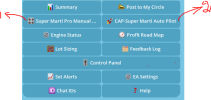
Super Marti Pro EA is the advanced version of Marti Pro EA. It keeps the Telegram-controlled risk and safety architecture, but refines the trade-cycle logic around Super Trend flip behavior and Entry TF / Trade TF alignment.
2. Search for BotFather. Make sure it is the official Telegram bot with verified identity.
3. Send /newbot.
4. Enter a display name for your bot, for example Marti Pro Control.
5. Enter a username that ends with bot, for example martipro_control_bot.
6. BotFather will return a bot token. Copy it carefully and keep it private.
7. Send one normal message such as Hello to your new bot. This helps Telegram create the chat session.
9. In a browser, open the Telegram getUpdates URL using your token: https://api.telegram.org/botYOUR_TOKEN/getUpdates
10. Look for the chat object and copy the id value. It may be a positive number for private chat or a negative number for group/channel.
11. Paste this number into InpControlChatId in the EA inputs.
12. For public posting, add the bot to the group/channel if required and obtain the group/channel chat ID for InpCircleChatId.
14. Open the Expert Advisors tab.
15. Tick Allow WebRequest for listed URL.
16. Click Add and enter: https://api.telegram.org
17. Click OK.
18. Restart the EA or reattach it if Telegram does not respond immediately.
I. Values commonly controlled from Telegram
| Value | Meaning | Common choices / caution |
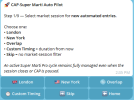
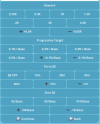
| Session | Controls when CAP can start new cycles. | London, New York, Overlap, Custom, or Skip. Existing cycle remains managed even if session closes. |
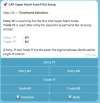
| TF / Entry TF | Timeframe used for fresh SuperTrend flip entry. | M1 is faster and noisier. M5 is slower and more filtered. |
| Trade TF | Only for Super Marti alignment builds. | Trade TF is a state filter; it should support the trade direction. |
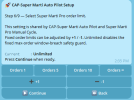
| Window / ST band window | Distance or filter used in cycle placement/validation. | Owner setup uses 300 pts. Confirm symbol point scale before live. |
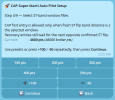
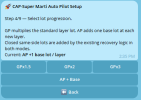
Lot progression | How lots grow in the cycle. | AP + Base is more controlled than GP. GP x2/x3 is more aggressive. |
| Hard cycle risk | Maximum cycle risk limit. | 50% is high risk and only listed for owner-provided cent-account demo profile. |
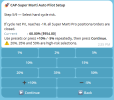
| Order limit | Maximum number of orders/layers. | 5 or 10 is safer. Unlimited should be used only after testing. |
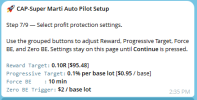
| Reward R | Cycle profit target measured in risk multiples. | If 0.1R is not available in your build, use 0.25R as the nearest available option. |
| Progressive target | Early full-cycle close target per base lot. | Owner setup uses 0.1% / Base. |
| Force BE / ZBE | Time-based cycle breakeven protection. | Owner setup uses 15 minutes and $5 / Base. |
| Daily target | Daily profit target where CAP can stop/pause. | Owner setup uses 4%. Use lower values on standard accounts. |
| Daily loss limit | Daily realized loss cap. | Owner setup: same as hard risk. Use smaller limits for standard live accounts. |
II. Telegram Bot Creation and MT5 Connection
Creating the bot with BotFather
1. Open Telegram.2. Search for BotFather. Make sure it is the official Telegram bot with verified identity.
3. Send /newbot.
4. Enter a display name for your bot, for example Marti Pro Control.
5. Enter a username that ends with bot, for example martipro_control_bot.
6. BotFather will return a bot token. Copy it carefully and keep it private.
7. Send one normal message such as Hello to your new bot. This helps Telegram create the chat session.
| Protect the token Anyone with the bot token may be able to control the bot API. Do not post the token in Telegram groups, screenshots, YouTube comments, or public channels. |
Getting the chat ID
8. Send a message to your bot from the Telegram account that will control the EA.9. In a browser, open the Telegram getUpdates URL using your token: https://api.telegram.org/botYOUR_TOKEN/getUpdates
10. Look for the chat object and copy the id value. It may be a positive number for private chat or a negative number for group/channel.
11. Paste this number into InpControlChatId in the EA inputs.
12. For public posting, add the bot to the group/channel if required and obtain the group/channel chat ID for InpCircleChatId.
Allowing Telegram WebRequest in MT5
13. In MT5, click Tools > Options.14. Open the Expert Advisors tab.
15. Tick Allow WebRequest for listed URL.
16. Click Add and enter: https://api.telegram.org
17. Click OK.
18. Restart the EA or reattach it if Telegram does not respond immediately.