
You are using an out of date browser. It may not display this or other websites correctly.
You should upgrade or use an alternative browser.
You should upgrade or use an alternative browser.
New EA CMD EA - Super EA 2026
- Thread starter agulinovich
- Start date

Hi, from the initial 200, I'm currently at 289 (so currently almost 50% off my starting point).Hi actualy what id your profit ?
As the user before me said, the EA was losing money in its last positions. In fact, I manually closed the positions and, as a new attempt, I'm testing the "inverted positions" (one of the options available in the EA) because in recent weeks I've noticed a bad tendency to go into massive DD, with the last position being a real problem. The first test with the inverted positions was much more positive; we'll see.


- Credits
- 236
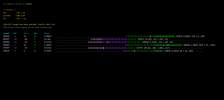
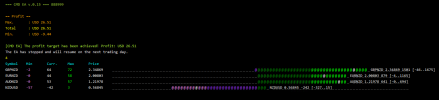
Berikut ini update CMD EA v.0.12 (dev)
Update:
- Banyak bug fixes
- Lebih informatif
- Log file di MT4/Files/CMDEA
- Tampilan pergerakan harga pair yang open
Pilihan Strategi yang bisa digunakan:
Basket profit. Profit target harian dalam persen balance di awal hari. Makin besar target, makin sulit dicapai. Untuk itu, perlu dilakukan eksperimen untuk mengetahui berapa profit maksimal yang bisa didapatkan dalam sehari. Bisa dilakukan dengan forward testing beberapa minggu kemudian mencatat berapa profit max yang di dapat tiap hari (ada di log file). Untuk itu target profit diisi kosong (0).
Basket profit dgn reverse/inverse trading. Jika sering drawdown besar di saat awal, bisa menggunakan strategi tambahan yaitu reverse / inverse trading. Opsi ini harus diaktifkan (true). Open posisi akan dilakukan berlawanan. Jika seharusnya SELL akan dibuka BUY dan sebaliknya. Dengan strategi ini, drawdown tadi akan diubah menjadi profit.
Individual pair profit. Masing2 pair yang terbuka bisa ditetapkan target (TP) dan loss (SL) dalam pips.
Menutup open posisi secara manual. Jika individual pair sudah profit bisa ditutup manual untuk realisasi profitnya.
Catatan:
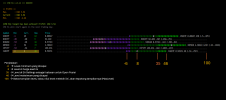
Ada setting penting yang mempengaruhi seberapa sensitif sensor untuk membuka posisi yaitu 'Level'. Makin kecil makin cepat open posisi tapi belum tentu berakhir profit. Bisa dilakukan eksperimen berapa nilai level yang ideal untuk masing-masing strategi, misal 20, 25, 30, 35, 40, dsb.
Tidak semua pair perlu anda masukkan dalam settings. Misalnya, anda dapat fokus pada pair JPY atau AUD saja. Mungkin anda juga mau bereksperimen dengan pair XAUUSD saja atau BTCUSD saja dengan penyesuaian settings.
Silahkan teman-teman share hasil eksperimennya untuk mendapatkan profit yang konsisten dari EA ini agar teman-teman yang lain bisa mendapatkan manfaatnya juga dan didiskusikan bersama.
Kalau ada usulan atau masukkan bisa disampaikan di forum atau grup telegram. ( https://t.me/+2-65bzqJ5K5mYjc1 )
Update:
- Banyak bug fixes
- Lebih informatif
- Log file di MT4/Files/CMDEA
- Tampilan pergerakan harga pair yang open
Pilihan Strategi yang bisa digunakan:
Basket profit. Profit target harian dalam persen balance di awal hari. Makin besar target, makin sulit dicapai. Untuk itu, perlu dilakukan eksperimen untuk mengetahui berapa profit maksimal yang bisa didapatkan dalam sehari. Bisa dilakukan dengan forward testing beberapa minggu kemudian mencatat berapa profit max yang di dapat tiap hari (ada di log file). Untuk itu target profit diisi kosong (0).
Basket profit dgn reverse/inverse trading. Jika sering drawdown besar di saat awal, bisa menggunakan strategi tambahan yaitu reverse / inverse trading. Opsi ini harus diaktifkan (true). Open posisi akan dilakukan berlawanan. Jika seharusnya SELL akan dibuka BUY dan sebaliknya. Dengan strategi ini, drawdown tadi akan diubah menjadi profit.
Individual pair profit. Masing2 pair yang terbuka bisa ditetapkan target (TP) dan loss (SL) dalam pips.
Menutup open posisi secara manual. Jika individual pair sudah profit bisa ditutup manual untuk realisasi profitnya.
Catatan:
Ada setting penting yang mempengaruhi seberapa sensitif sensor untuk membuka posisi yaitu 'Level'. Makin kecil makin cepat open posisi tapi belum tentu berakhir profit. Bisa dilakukan eksperimen berapa nilai level yang ideal untuk masing-masing strategi, misal 20, 25, 30, 35, 40, dsb.
Tidak semua pair perlu anda masukkan dalam settings. Misalnya, anda dapat fokus pada pair JPY atau AUD saja. Mungkin anda juga mau bereksperimen dengan pair XAUUSD saja atau BTCUSD saja dengan penyesuaian settings.
Silahkan teman-teman share hasil eksperimennya untuk mendapatkan profit yang konsisten dari EA ini agar teman-teman yang lain bisa mendapatkan manfaatnya juga dan didiskusikan bersama.
Kalau ada usulan atau masukkan bisa disampaikan di forum atau grup telegram. ( https://t.me/+2-65bzqJ5K5mYjc1 )
Attachments
Last edited:
- Credits
- 236
Tambahan:
Anda dapat memasang EA ini di beberapa chart untuk menguji strategi yang berbeda di terminal yang sama.
Gunakan input MagicNumber yang berbeda untuk tiap EA di tiap chart untuk membedakan satu dengan yang lain agar tidak konflik.
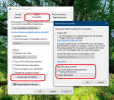
Jika tampilan teks di terminal metatrader kurang pas, penyesuaiannya adalah sebagai berikut:
1. Buka folder metatrader: File - Open Data Folder
2. Klik kanan file terminal.exe - pilih Properties
3. Pilih tab Compatibility kemudian klik tombol Change high DPI settings
4. Centang Override high DPI scaling behaviour
5. Ubah Scaling perform by menjadi System (Enhanched)
Anda dapat memasang EA ini di beberapa chart untuk menguji strategi yang berbeda di terminal yang sama.
Gunakan input MagicNumber yang berbeda untuk tiap EA di tiap chart untuk membedakan satu dengan yang lain agar tidak konflik.
Jika tampilan teks di terminal metatrader kurang pas, penyesuaiannya adalah sebagai berikut:
1. Buka folder metatrader: File - Open Data Folder
2. Klik kanan file terminal.exe - pilih Properties
3. Pilih tab Compatibility kemudian klik tombol Change high DPI settings
4. Centang Override high DPI scaling behaviour
5. Ubah Scaling perform by menjadi System (Enhanched)
- Credits
- 236
Berikut ini penjelasan melalui gambar terkait settings 'Level'

kevinbali06
New Member
- Credits
- 97
You're welcome, I'm always happy to lend a hand!
Anyway, I left all the pairs at their default settings. The only change I made was the 10% basket profit instead of the standard 3%.
This 10% concept should be applied to small investments, like €100. For example, starting from €1,000, I would reduce both the profit and the DD stop loss, for example, 1% profit and 5% DD stop loss, also adjusting the lot ratio, moving to 0.01 for every €1,000.
In this case, both the profit and loss are reduced tenfold, but with larger amounts, the risk is more acceptable.
It all depends on the EA's ability to manage its positions. If it always manages to close positions, especially if you hedge with buys and sells on the same pair, then you could risk a little more.
kevinbali06
New Member
- Credits
- 97
Hi.. Do you know setting for drawdown stoplose 15%? Ratio profit and loss 1:5 for me is the best
kevinbali06
New Member
- Credits
- 97
Same with me for today brother.. Loss 400usd but in cents..large loss today with this ea more than 380 € of loss. perhaps set is no good for me
the only difference with your ea basic set is balance per lot = 400.
- Credits
- 236
- Credits
- 236
om jadi kalo mau buat lotnya 0.01 balance 10k jadi balanceperlotnya 100k ya om? kemudian mau tanya kalau TP apakah harus isi? kalau tidak diisi dia akan close di profit berapa?
Last edited:
- Credits
- 236
Balance 10.000om jadi kalo mau buat lotnya 0.01 balance 10k jadi balanceperlotnya 100k ya om? kemudian mau tanya kalau TP apakah harus isi? kalau tidak diisi dia akan close di profit berapa?
BalancePerLot --> Lot
10.000 --> 1
100.000 --> 0.1
1.000.000 --> 0.01
Kalau TP tidak diisi, semua akan di close saat mencapai target di DailyProfit_percent atau DailyProfit_money.
Kalau tidak tercapai, di akhir hari akan di close semua baik untung maupun rugi.
ada set yang bagus om, untuk modal 10k? kemudian untuk tfnya pakai berapa?Balance 10.000
BalancePerLot --> Lot
10.000 --> 1
100.000 --> 0.1
1.000.000 --> 0.01
Kalau TP tidak diisi, semua akan di close saat mencapai target di DailyProfit_percent atau DailyProfit_money.
Kalau tidak tercapai, di akhir hari akan di close semua baik untung maupun rugi.

In the previous settings, the basket target was 3% with TP set to 0.
In the latest settings, the basket target has been increased to 5%, and TP is set to 10.
If the basket target has not been reached yet, but some orders are already closed by the Take Profit, will the overall results be better?
Based on your backtests, which configuration performs better?
I have been testing a 10% basket target with TP set to 0 for the past three days. So far, I haven't encountered a 50% DD stop-loss, so the testing period is still too short to estimate its probability.
If the EA can run for 5–10 days without hitting the 50% DD stop-loss, then I think it would be reasonable to say that the probability of this EA performing well is quite promising.
In the latest settings, the basket target has been increased to 5%, and TP is set to 10.
If the basket target has not been reached yet, but some orders are already closed by the Take Profit, will the overall results be better?
Based on your backtests, which configuration performs better?
I have been testing a 10% basket target with TP set to 0 for the past three days. So far, I haven't encountered a 50% DD stop-loss, so the testing period is still too short to estimate its probability.
If the EA can run for 5–10 days without hitting the 50% DD stop-loss, then I think it would be reasonable to say that the probability of this EA performing well is quite promising.
Ijin download Pak, terima kasih.Versi terbaru.


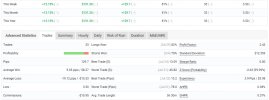
any good set?
ada MT5 nya kah kang?Berikut ini adalah EA yang saya buat sendiri.
EA ini merupakan multipair. EA akan mencari pair yang kira-kira akan profit hari itu. Daftar pair ada di settings dipisahkan dengan koma.
Karena multipair, EA ini tidak bisa di-backtest.
Sensitifitas pembukaan open position tergantung nilai 'Level' pada setting. Kondisi ideal bernilai 20-50.
Silahkan pasang EA di chart pair dan TF mana pun.
EA akan memantau pair-pair yang akan memberikan profit hari itu.
Silahkan tunggu EA akan membuka beberapa pair.
Kapan close OP?
1. Bisa close manual tiap pair kalau sudah puas dengan profit pair tersebut.
2. Sesuai setting dengan basket profit, misalnya 3% dari balance awal hari.
Catatan:
1. Pair yang sudah profit dapat berubah menjadi loss. Jadi, kalau sudah puas dengan profit, dapat close manual.
2. Gunakan akun demo dan jangan di close manual untuk mempelajari berapa rata-rata profit maksimal yang bisa dihasilkan tiap pair dan berapa total profit maksimal dalam sehari.
3. Pair yang tidak close akan di close di akhir hari.
Silahkan dicoba dan berikan komentar hasil forward test-nya.
Mudah-mudahan ini menjadi EA yang profitable karena pernah mencapai profit di atas 10% per hari.
Selamat mencoba.