
You are using an out of date browser. It may not display this or other websites correctly.
You should upgrade or use an alternative browser.
You should upgrade or use an alternative browser.
Suggestion FiboActiveBot - good tool with EA possibilities.
- Thread starter Andy4Rum
- Start date

i have try diff setting but still not having good results yet (some days yes good profits other the opposite , all profits gone + the initial deposit )
can anybody share more info ?
example
pairs ? time period ?
TP SL ? other setting ?
if somebody trade on Fridays what pairs trade ?
i use at the moment time period 8 am - 8 pm Mondey - Thursday (London - NewYork)
try all 28 pairs
TP 30 , SL 100, with reailing on , COS on , LOTSx2 on
i have made some suggestion above ... any news about ?
a news filter will help ?
can anybody share more info ?
example
pairs ? time period ?
TP SL ? other setting ?
if somebody trade on Fridays what pairs trade ?
i use at the moment time period 8 am - 8 pm Mondey - Thursday (London - NewYork)
try all 28 pairs
TP 30 , SL 100, with reailing on , COS on , LOTSx2 on
i have made some suggestion above ... any news about ?
a news filter will help ?

Hello, I'd like to ask you, I will automatically open an order when I retest, but I load it on the MT4 real disk. When I send out the order opening signal, EA just pops up the signal prompt box and will not automatically place an order. What's the matter?
Hi
Can you check the sets as we show in the guide? I means, all tics in the common sets (allow live trading etc)
Also, be sure, that next buy/sell buttons on the chart should be GREEN. Send me a chart screenshot to
direct message, let's see together.
i have try diff setting but still not having good results yet (some days yes good profits other the opposite , all profits gone + the initial
try all 28 pairs
TP 30 , SL 100, with reailing on , COS on , LOTSx2 on
i have made some suggestion above ... any news about ?
a news filter will help ?
Did you try optimization? I didnt use all 28 pairs, most of the time 3-5 pairs as explained.
Also, I shared an example on the page 82... I use backtesting as the way to find out some
TP/SL levels based on past fluctuations, plus learning option (about the effect of options).
I'd say, even if I find you powerful configuration, that show profit in X time period - it wont
mean anything for the future. Better to adopt sets for current Market conditions as well as
main point I noted - check the signal daily... no need to use "bad" signals - just switch to
other pairs with better performance. Just IMHO.
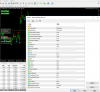
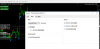
This is my setting parameter, please see what's wrong?
Hi
It's easy... first of all, pay attention to all options that you have enbabled.
You have filter on true - it means that all trades will be in same direction with filter.
Moreover, option Xmove enabled too... it means, that if you get BUY order, it will
open just if price drop on extra 10 pips (price goes down after alert on 10 Pips, jusr
that order will be opened).
So, filter.. XMove... these options add quite narrow hall for trading...
Please, cgeck the guide I sent you... in V2 we added many options to make it good for
many traders... but you need to disable most of them, take just ones you like or leave
clear TP/SL... disable frieday and add TSL or BE

This is my setting parameter, please see what's wrong?
also, better to limit time trading and chose pairs as I suggested on page 82. Anyway, just IMHO.


- Credits
- 0
Hi
It's easy... first of all, pay attention to all options that you have enbabled.
You have filter on true - it means that all trades will be in same direction with filter.
Moreover, option Xmove enabled too... it means, that if you get BUY order, it will
open just if price drop on extra 10 pips (price goes down after alert on 10 Pips, jusr
that order will be opened).
So, filter.. XMove... these options add quite narrow hall for trading...
Please, cgeck the guide I sent you... in V2 we added many options to make it good for
many traders... but you need to disable most of them, take just ones you like or leave
clear TP/SL... disable frieday and add TSL or BE
Hello there bro, if i set filter as true...does it mean the EA will only take trade if the arrow and the filter is in sync ?
So lets say the arrow is blue, but the filter line is red...the EA won't open any position
When both are blue or both are red, then it will open position, is this correct ?
Thanks
Hi Andy, can you share new update this EA ! my email: [email protected], big thanks broalso, better to limit time trading and chose pairs as I suggested on page 82. Anyway, just IMHO.
 )
)Hello there bro, if i set filter as true...does it mean the EA will only take trade if the arrow and the filter is in sync ?
So lets say the arrow is blue, but the filter line is red...the EA won't open any position
When both are blue or both are red, then it will open position, is this correct ?
Thanks
Hi Reo, nice to hear from you
1) Yes, if you set filter on true... that EA will take just arrow in same direction. (filter blue means buy, than only buy arrows will be
taked for orders. Red will be ignored).
2) when both blue ot both red - than you get an order. Right
Stay safe
- Credits
- 0
Andy,
A suggestion on Lo2X. Instead of true or false. Should allow user to define the factor.
So zero or one means no Lo2X(or Lot2x=false), but user can specify 1.5 or 2 or 3.15 or 0.5 etc, depending on the risk appetite.
A suggestion on Lo2X. Instead of true or false. Should allow user to define the factor.
So zero or one means no Lo2X(or Lot2x=false), but user can specify 1.5 or 2 or 3.15 or 0.5 etc, depending on the risk appetite.
Last edited:

Hi Andy!!Hi Reo, nice to hear from you
1) Yes, if you set filter on true... that EA will take just arrow in same direction. (filter blue means buy, than only buy arrows will be
taked for orders. Red will be ignored).
2) when both blue ot both red - than you get an order. Right
Stay safe
I reading there all post. And I saw all positive.Thanks your hard work. And please send me too full version of FAB EA.
My email: f[email protected]
Thanks!!
Last edited:
Andy,
A suggestion on Lo2X. Instead of true or false. Should allow user to define the factor.
So zero or one means no Lo2X(or Lot2x=false), but user can specify 1.5 or 2 or 3.15 or 0.5 etc, depending on the risk appetite.
Yes, sounds good... I feel that such type of lot compensation is better... at least, you can make it a bit smaller - just to reduce risks or
make higher if this suitable for the strategy you follow.
Good idea, thank you.
Yes, sounds good... I feel that such type of lot compensation is better... at least, you can make it a bit smaller - just to reduce risks or
make higher if this suitable for the strategy you follow.
Good idea, thank you.
Yes, just sent you a version to try. Anyway, be careful and original idea was to use it as semi-auto tool (it allowed 2 trades on auto).
That was an idea - to allow it to trade under traders control, but be able to stay away from the computer for a while...
You can try any combination,
Thanks
Thanks. I received the file.Yes, just sent you a version to try. Anyway, be careful and original idea was to use it as semi-auto tool (it allowed 2 trades on auto).
That was an idea - to allow it to trade under traders control, but be able to stay away from the computer for a while...
You can try any combination,
Thanks
İ test it and share results.

- Credits
- 0
This is my review for this thread:
good indicator
good indicator