hi MASTER TANAKA ...please make EA on this good no repaint indicator.
inputs
1...trade signal to signal
2...TP SL TS BE
3..magic number
thankx
already done for you by Tanaka, you can disable marti, credits goes to tanaka and saidi, likes goes to me


hi MASTER TANAKA ...please make EA on this good no repaint indicator.
inputs
1...trade signal to signal
2...TP SL TS BE
3..magic number
thankx
Dear Ahmad, i have some ideas if you agree add in Zaman MA Cross EA:
1) Baskets:
- Global Basket = X% of the Balance.
(when profits are X% of the Balance the EA close ALL orders and is ready to start again).
- Total Sell orders Basket = X % of the Balance.
(when sell orders are X% of profits, the EA close all sell orders).
- Total Buy orders Basket = X % of the Balance.
(when buy orders are X% of profits, the EA close all buy orders).
If the value is 0 then the tool is disable.
2) Daily Take Profits hour:
- Daily TP hour: XX:XX
(EA will close all orders at this time only if Total Profits are in positive, never in loss).
3) Marti TP:
When the Marti System (atack marti) is in action, the TP should change for a smaller TP.
- I mean: at first the Tp could be YY pips or wherever…. But when the martingale system is actived then the TP must change to XX pips.
A different TP for the first order thant the average TP when the martingale is working.
2 more details that I think must be fixed
a) the EA has a "Trade on new candle" tool
this not work like I hoped, the EA open the order when the emas cross each other but not wait for the order close
b) I think that in marti, sometimes there are some orders that not close... I am not totally sure about this but it can be confirmed
Hi AhmadIt's working with me and I gave you after test.

Hi, I found the problem.Hi Mr Tanaka san..
Good day to you..
the EA still having 2 problems..
no.1.
TP not modified to the last order even i had set in the EA.
It will have individual TP with 20pips but not as all trades follow last trade..
View attachment 91550
View attachment 91553
no.2
TP not followed my setting TP = 20pips..
it will still modified TP by itself on average.. this one i cannot show in picture.. because it is moving TP by the robot.
My previous video had the recording showing the EA modified the TP from 20pips to 30pip, then from 30pips to 50pips.
Here is another example the TP modified EA after the trades closed..but this one is close in loss.
For the BUY martingale.. it didnt closed with profits when all trades supposed to close with last order TP = 20pips.
But these BUYs order closed on losses later after..
View attachment 91554
I think this ea still having bugs / errors that need to be corrected..
Hope you can help to check and revise it.
Thanks in advance.

Hi Tanaka akiko san
I join the 2 tdeliev reports, and I add one
I left the initial configuration SET and performed a back test with these parameters (so you can simulate it)
View attachment 91382
I'm on DEMO
I highlight two things to you
as tdeliev wrote, sometimes the opening takes place in the current candle even though I left the "nextcandela" setting (red arrow)
Also when setting the stoploss it sometimes the ordermod returns error 130 (maybe this is due to my settings?)
View attachment 91383
thank you so much
I hope I was helpful
Arigato
Please don't use breakeven.Hi Mr Tanaka san
sorry to bother you
did you even check this modify error?
is it a problem of my configuration?
thank you
Hello

Hi, this is the final version.Dear Tanaka San, please find results of the last version along set file which is not bad. Orders are being picked perfectly on 3rd bar.
Also I tested with max order 2, it took 2 opposite orders as below on same 2 different dates, anyways still fine as it happened only 2 times in 7 months test.
View attachment 91604
After changing back to max order 1, below are the results and set file attached
View attachment 91593
View attachment 91594
View attachment 91595
Now please as discussed earlier, lets make it final. Please change screen text as below;
View attachment 91598
1- New Order "Zaman BSTrend" and for martin "Martin ZBST".
2- Remove all arrows except tiny arrows on candle like other EAs.
3- Add sessions indicator.
4- Make set file as default and keep only lot size and risk in MM option and remove other martingale details. Martingale options are already in attack martingale details.
5- Also if possible, when TP hit and same signal is active, can EA take new order as per the current TF. So after closing of first order on TP and if same signal is active, EA can pick another order when new candle appear as per the TF ? If yes then it would be wonderful in case if signal is long so EA will keep hiting TP and open new order on same signal. But one order at a time like normal trade. This will be very profitable if each candle close TP instead of EA wait for new signal. If with On/ Off option for this, that will be more awesome.
EG: SELL Signal > Order picked > TP Hit > Same SELL signal active on current TF > EA picked new order on new candle > TP hit > Same procedure continues till signal changes.
EA main windows as below;
View attachment 91600
6- Only below settings required in settings, rest remove plz,
View attachment 91603
Any changes or request to add by any member, you can offer this current version but nothing to add in final version.
Arigato.

Since it is kind of complicated and hard to code, so I want to start coding with my template.Dear Tanaka san
Thank you very much for response my email. I will explain roughly about parameters first :
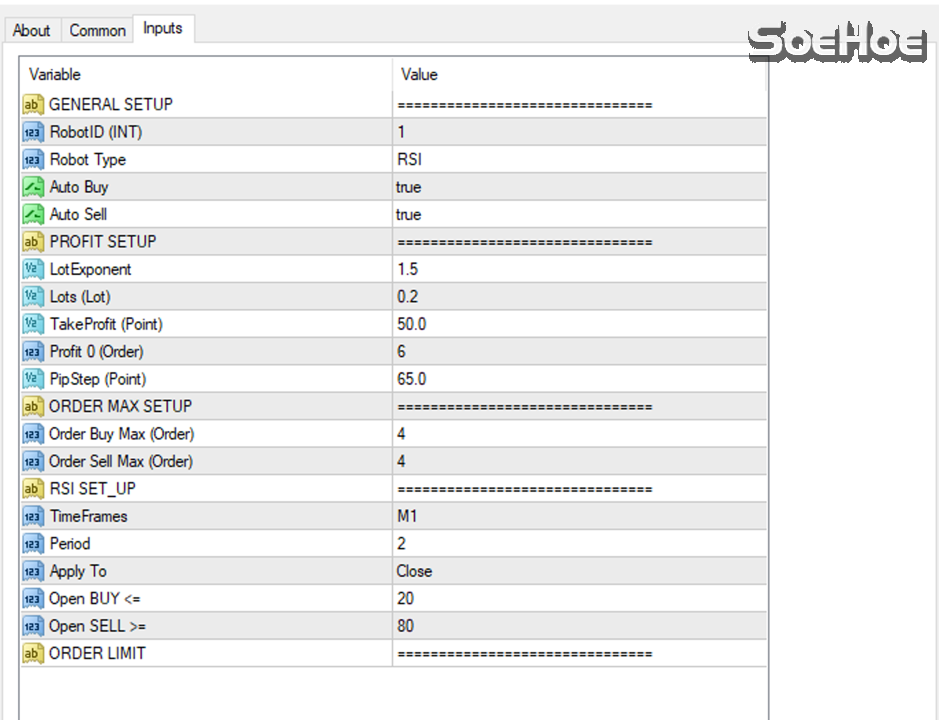
·EA Type : RSI or RANDOM , When RSI will need to follow RSI condition below. When Random, only price move.
·RSI (Period) : Place 1stSell / Buy based on RSI(Period)
·Random : Randomly place 1st Sell or Buy
·Auto Buy : True/False : Allow EA to Buy automatically
·Auto Sell : True/False : Allow EA to Sell automatically
·Lot Exponent : To determine the Lot exponent 3rdorder . The 1stand 2ndorder are same lot
·Lots (Lot) : Initial Lot
·Take Profit(Point) : Count by Point (Exclude Spread)
·Profit 0 (Order) : Example EA are openning 5 trades, the trade 6th will calculate Lot size to make 5 openning trades become 0 Profit if hit Target (set by TakeProfit)
·Pipstep (Point) : When price are moved N Points , the EA trigger Buy/Sell . Exclude Spread.
·Order Buy Max (Order) : Maximum number of Buy position
·Order Sell Max (Order) : Maximum number of Sell Posistion
·Timeframes : Determine how RSI’s preiod
·Apply to : Open or Close price or bar/candle
·OPEN BUY <= : System will trigger Buy if Price move N points and RSI(Period) < this parameter
·OPEN SELL >= : System will trigger Sell if Price move N points and RSI(Period) > this parameter
System Logical :
1.Setup initial Lots for Intial Buy or Sell (Buy/Sell 1) by RSI(2) AND Price move XXX Point from when Auto Trading Enabled.
2.Price move N points (PipStep) AND RSI(Period) is : EA will open 2nd buy/sell and modify TARGET PRICE of combination Buy/Sell 1 + Buy/Sell 2. So both Buy/Sell 1 and Buy/Sell2 will have same TP
3.Price move N points : EA will open 3rd buy/sell with new Lots = LotExponent * Inital Lots and modify TP of Buy/Sell1 , Buy/Sell2, Buy/Sell3 so all 3 Positions will have same Target Price.
4.Continue until MAX Open Order is hit.
5.Buy/Sell determine by Random or RSI (Period)
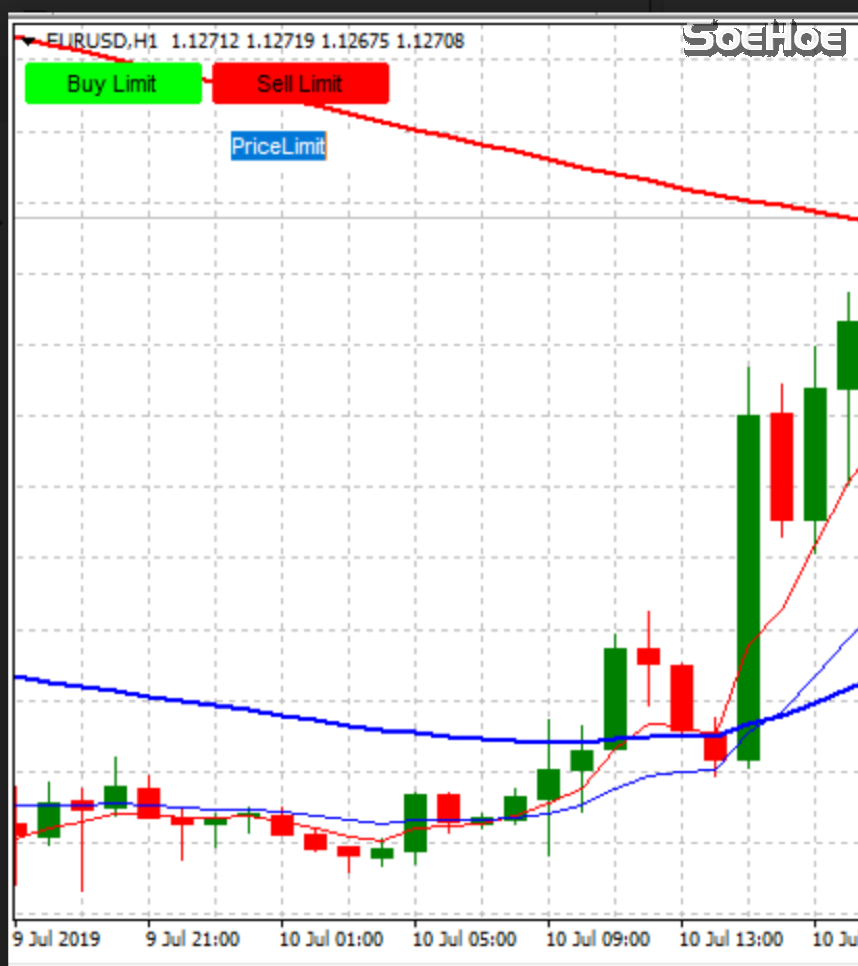
6.There are 2 button : BUY LIMIT and SELL LIMIT and one Manual input Limit Price . This is to trigger last order to balance all Pre-Openned Positions and Modify TP of ALL positions to same TP (see images 2). This is key thing when want to system to SOFT CLOSE all position , will open last buy Manually by technical analyst .
Please help to add some features :
1.Start time , Stop time
-Before Start time , After Stop time : : OPEN BUY <=0, OPEN SELL >=100 : So AUTO TRADING Still keep enable without need to Stop.
-Between Start time and Stop time : Follow by Parameter
2.Add options to start Exponents Lot number from which orders (examples Exponents from 4thorders,…)
3.Option to select BUY&SELL , ONLY SELL , ONLY BUY
4.Basket Profit to close all orders same as your EA3strategies
5.STOP EA (SOFT STOP) Before Red news N hours
Images2
Thank you very much
Best regards
Anh
I tired to think about how I can code but it concluded that it is hard for me. so instead, can you put EA in 2 chart and one is buy only and another is sell only?All that possible, so we can control buy and sell behavior separately. If possible include separate manual input magic number, so we can control if we want buy and sell behave as different magic number or same magic number.
Sorry, I don't understand. How can I help?Sir Tanaka, about EA_MACD, is the value for MACD already preset like my request? (15,21,3)
Nice!, please FT and share my fxbook, please.One year backtest on EURUSD. Super arrow Rev eView attachment 91495View attachment 91496
Can you use MaxOrder=1?Hi sir Tanaka San,
Please make this ea to place only one order at a time.
When there is 1 buy/buystop there should be no sell/sell stop opened or when there is 1 sell/sell stop there should be no buy/buy stop opened. Until the order (buy/buy stop or sell/sell stop) is closed then continue opening order.
This is to reduce unnecessary floating p/l as the ea is attached to 10 pairs.
Thank you Sir Tanaka,
I tired to think about how I can code but it concluded that it is hard for me. so instead, can you put EA in 2 chart and one is buy only and another is sell only?
ok, i'll send you full explaination later. tq.Sorry, I don't understand. How can I help?
you might also check about the 4 MA lines in EA_MACD.ok, i'll send you full explaination later. tq.

Hi, I found the problem.
The reason why attack martin orders were not modified is that it was due to order modify error.
I coded the output in the journal.
View attachment 91626
Attack martin last open order price (it shows average price in MT4) is 1.422
and the modified tp is 1.42065, which is lower than open order price.
So EA tried to modify it but since tp is below open order price, it shows order modified error and tp was failed to modified.
To solve the issue, I chanced code to modify only when the tp is higher than openorderprice (in case of buy) and lower than openorderprice (in case of sell).
This is not what you want but if you have any other ideas, let me know.
I have an idea. If order modify is not possible, how about close all order by profit$.Hi Mr Tanaka san..
Thanks for your changes on the EA.
i will test it out and see if it gives good results.
appreciate your time and efforts!
Thanks